Turn your annual objectives into a monthly budget
Budget, actuals, variance and forecast connected to editable inputs.
One-time payment
$15
Hosted checkout by Recurrente · immediate on-site fulfillment after payment confirmation · 15-day refund period.
Recognize the problem
Three signals that the current approach is costing clarity.
A useful budget changes with reality; it does not remain frozen after January.
Inputs are not connected to the decision.
The example does not explain how to customize it.
Practical outcome
Translate annual objectives into a monthly budget that is updated with actual results.
What is included
The working pieces, connected.
Minimum scope
Workbook de siete tabs, presupuesto, actual, forecast y dashboard.
Safe preview
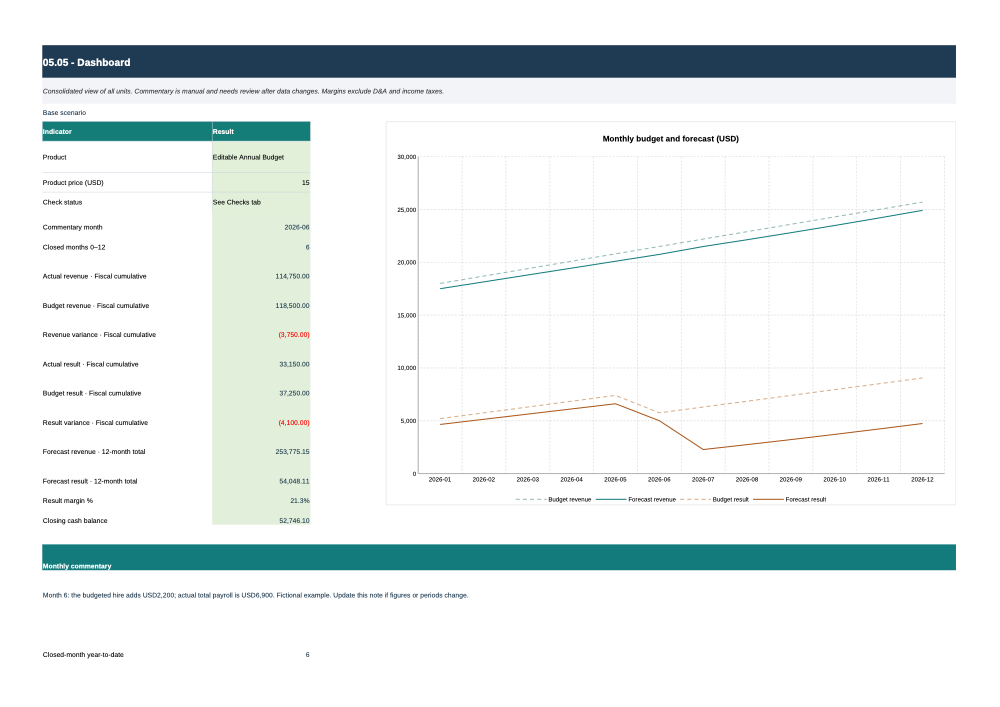
Monthly comparison and assumption review. Closed months: actual amounts. Future months: month-1 revenue × monthly growth × seasonality × scenario; variable costs on revenue, fixed expenses with inflation, base payroll plus hiring. Nonrecurring expenses and capex use the budget schedule.
The preview shows structure and a limited example; it does not expose the complete paid editable or delivery file.
How it works
From context to a reviewable output.
- 1
Define the context and decision.
- 2
Complete the required inputs.
- 3
Produce a first working version.
- 4
Review, validate and adapt.
This is for
Consultants, agencies, family businesses, digital retailers, microbusinesses and independent professionals.
This is not for
It is not for anyone seeking guaranteed results, regulated advice or a file that works without data or review.
Method and limits
Useful when judgment stays in the loop.
Methodology and author
Define context, complete inputs, produce, review and adapt. Designed and signed by Julio Alonzo. Designed and signed by Julio Alonzo.
Requirements and limitations
A 12-fiscal-month model from the selected year and month, in USD with no currency conversion. The cutoff counts complete months: 0 means all future; 12 means all actual. Selected month controls the dashboard view, not the cutoff. The example retains original revenue, cost, payroll and expense series. Budget payroll is separated into a USD4,800 base and a USD2,200 hire from month 6 through 12. USD500 monthly actual capex is an explicit new fictional assumption. Starting nonrecurring expenses are zero. 20 prepared rows per table. Each account/unit combination must be unique. In a used row, enter zero for a known nil amount; a blank cell means missing data. The summary groups rows by type, adjusts revenue for seasonality and costs/expenses for inflation, and includes events. Base payroll, hiring and capex are not inflated. Do not duplicate events in entries. Effective annual inflation factor: (1 + rate)^((fiscal month − 1)/12). It applies to budget costs, operating and nonrecurring expenses, and forecast fixed expenses. Starting rate is zero. Seasonality multiplies budget and forecast revenue by the monthly factor; factors are not normalized and may change the annual total. 15 events. Type 1: hiring, 2: capex, 3: nonrecurring expense. Inclusive fiscal months 1–12; a one-off uses the same start and end month. Do not enter these amounts again in the budget base. Actual entries must include their realized amounts. Closed months: actual amounts. Future months: month-1 revenue × monthly growth × seasonality × scenario; variable costs on revenue, fixed expenses with inflation, base payroll plus hiring. Nonrecurring expenses and capex use the budget schedule. Forecast growth compounds from fiscal month 1: base revenue × (1 + growth)^(month − 1). It is not added to the manual budget or restarted when the cutoff moves. Update future assumptions when plans change. The forecast does not automatically extrapolate the latest actual. The selector changes only future revenue and its variable costs. Closed months and budget do not change. Select 1, 2 or 3 to recalculate and compare active results; this view does not show three simultaneous calculations. Collections and payments are assumed in the same month. The cash charge is an illustrative rate on revenue in every month, not a local tax calculation or income tax. Working capital, debt, interest and depreciation are excluded. Capex reduces cash, not the simplified operating result. Margin percentages divide result by revenue; zero revenue returns n.a. Variance = actual − budget. Positive is favorable for revenue and profit. Percentage = variance / absolute budget; zero budget returns n.a. Consolidated view of all units. Commentary is manual and needs review after data changes. Margins exclude D&A and income taxes. These reconciliations detect defined inconsistencies; they do not certify the accounts or entered data. The native Microsoft Excel interface was not tested.
Cutoff date: 2026-10-12
FAQ
Before purchasing.
Answers derived from the product file and its commercial kit.
Secure purchase
Pay at Recurrente. Download here.
The Site never receives card data. Recurrente confirms the payment by signed webhook and this page releases only the files linked to that paid session.
$15
- ✓ One-time payment in USD
- ✓ Verified ZIP package
- ✓ 15-day refund period
- ✓ Support by email
Same system